
✍️ OffheMan Editorial Team • 📖 8 Min Read • 📅 Updated July 2026
Top 10 Mistakes People Make When Buying an Office Chair can cost you more than just money—they can lead to poor posture, reduced productivity, and long-term discomfort. At OffheMan, we’ve helped startups, large corporations, educational institutions, and home-office users choose office furniture that fits both their budget and their daily work routine. Over the years, we’ve noticed that many purchasing decisions are driven by appearance, discounts, or brand names instead of ergonomics, comfort, and long-term usability. This guide shares practical insights to help you avoid these common mistakes and choose an office chair that supports your health, productivity, and workspace for years to come.
By avoiding these Top 10 Mistakes People Make When Buying office furniture, you’ll make a smarter purchasing decision and enjoy greater comfort for years to come. Whether you’re Buying an Office Chair for a home office, startup, educational institution, or corporate workspace, following a trusted Office Chair Buying Guide and understanding How to Choose an Office Chair will help you avoid common Office Chair Buying Mistakes and select a chair that truly supports your work.
An office chair is more than just another piece of furniture. It’s where you spend a significant part of your day—working, attending meetings, brainstorming, or studying. A poor-quality chair can lead to discomfort, fatigue, and even posture-related issues over time. On the other hand, a thoughtfully designed ergonomic chair supports your body, improves posture, and contributes to greater productivity.
Explore OffheMan’s complete collection of Office Chairs designed for home offices, startups, and corporate workspaces.
Why Buying the Right Office Chair Matters
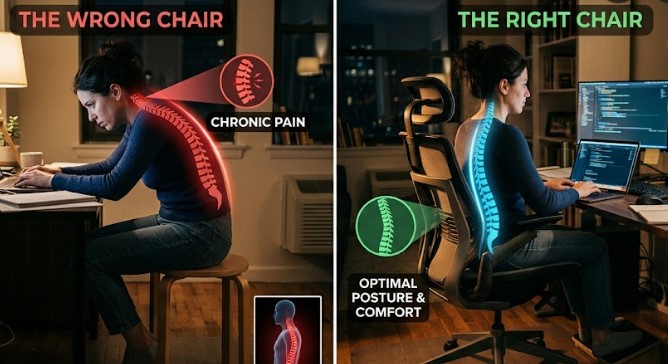
According to the Occupational Safety and Health Administration (OSHA), using ergonomic office furniture and maintaining proper sitting posture can help reduce workplace discomfort and improve employee productivity.
Every Office Chair Buying Guide emphasizes that selecting the right chair is about more than appearance or price. Understanding How to Choose an Office Chair involves evaluating ergonomics, adjustability, build quality, and long-term comfort. By avoiding common Office Chair Buying Mistakes, you’ll enjoy better posture, improved productivity, and a healthier workspace.
Many people underestimate the importance of choosing the right office chair. A chair that lacks lumbar support, adjustability, or proper cushioning may feel acceptable for the first few days but can become uncomfortable after weeks of regular use.
Professionals who spend six to ten hours sitting each day should think of an office chair as an investment rather than an expense. A high-quality ergonomic chair helps reduce pressure on the lower back, supports healthy posture, and encourages movement throughout the day.
Benefits of Choosing the Right Office Chair
- Improves posture
- Supports lower back
- Reduces fatigue
- Improves productivity
- Better blood circulation
- Comfort during long work sessions
- Longer product lifespan
Mistake #1 – Buying Only Based on Price
One of the biggest mistakes buyers make is choosing the cheapest chair available without considering its long-term value. While saving money initially may seem like a smart decision, an inexpensive chair often lacks ergonomic features, durable materials, and reliable support.
Instead of asking, “What’s the cheapest chair?” ask yourself, “Which chair will still feel comfortable after eight hours of work every day?” Investing slightly more in a well-built ergonomic chair often saves money in the long run by reducing replacements and improving comfort.
Mistake #2 – Ignoring Ergonomic Features
Many buyers focus on colour and design while overlooking the features that actually determine comfort. Adjustable lumbar support, seat height, reclining mechanisms, seat depth, armrests, and headrests all play an important role in maintaining healthy posture.
Choosing an ergonomic office chair that adapts to your body is far more beneficial than selecting one based only on appearance.
Essential Ergonomic Features
- Adjustable lumbar support
- Height adjustment
- 4D armrests
- Tilt lock mechanism
- Headrest adjustment
- Breathable materials
- Strong metal base
Mistake #3 – Choosing Style Over Comfort
A modern-looking chair can certainly enhance the appearance of your workspace, but style should never come before comfort. Buyers often choose a chair because it matches their office décor, only to discover later that it doesn’t provide adequate support for long working hours.
One of the biggest Office Chair Buying Mistakes is assuming that an attractive design automatically provides comfort. When Buying an Office Chair, always prioritize ergonomic support over visual appeal. This simple approach can help you avoid many of the Top 10 Mistakes People Make When Buying office furniture.
Whenever possible, prioritize ergonomics, adjustability, and build quality before aesthetics. A chair that feels comfortable every day will always provide greater value than one that simply looks impressive.
Many buyers repeat the Top 10 Mistakes People Make When Buying an Office Chair simply because they focus on price instead of ergonomics and long-term comfort.
Mistake #4 – Buying the Wrong Chair Size
Not every office chair is designed for every body type. Many buyers assume that all chairs offer a universal fit, but that’s rarely the case. A chair that’s too large can make it difficult to maintain proper posture, while one that’s too small may not provide adequate support for your hips, thighs, and back.
Before purchasing an office chair, check the seat width, seat depth, maximum weight capacity, and recommended user height. If multiple people will be using the chair, choose one with a wide range of adjustments so it can accommodate different body types comfortably.
Check Before Buying
- Seat Width
- Seat Depth
- Weight Capacity
- Recommended User Height
- Backrest Height
- Armrest Width
Mistake #5 – Ignoring Chair Materials
Materials play an important role when Buying an Office Chair. A quality Office Chair Buying Guide recommends selecting upholstery based on your climate, working hours, and maintenance preferences rather than appearance alone. Knowing How to Choose an Office Chair also means understanding how different materials affect comfort throughout the day.
One of the most overlooked factors when purchasing an office chair is the material. Upholstery affects breathability, durability, maintenance, and overall comfort. While design often grabs attention first, the material determines how comfortable the chair remains throughout the day.
Mesh office chairs provide excellent airflow and are ideal for professionals who spend long hours sitting, particularly in warmer climates. Leather office chairs, on the other hand, offer a premium executive appearance and plush cushioning but generally require more maintenance.
Fabric chairs offer a balance between comfort and affordability, while premium PU leather delivers a modern appearance with easier maintenance than genuine leather. Each material has advantages depending on your work environment and personal preferences.
| Material | Advantages | Best For |
|---|---|---|
| Mesh | Breathable, lightweight, modern | Long working hours |
| Leather | Executive appearance, luxurious feel | Manager cabins |
| Fabric | Comfortable and economical | Home offices |
| PU Leather | Premium look, easier maintenance | Modern workspaces |
Mistake #6 – Ignoring Warranty and After-Sales Service
Many buyers compare only prices and specifications but overlook warranty coverage. A good office chair is a long-term investment, and reliable after-sales support can make a significant difference if replacement parts or repairs are needed.
Look for manufacturers that provide clear warranty policies, responsive customer support, and spare parts availability. Chairs with longer warranties often reflect greater confidence in product quality.
Warranty Checklist
- Manufacturer Warranty
- Replacement Parts Available
- Installation Support
- Repair Services
- Customer Care Availability
- Return Policy
Mistake #7 – Buying Without Testing the Adjustments
Testing every adjustment before purchasing is one of the easiest ways to avoid Office Chair Buying Mistakes. Professionals researching How to Choose an Office Chair should always compare lumbar support, reclining functions, and seat adjustments before making a final decision.
Many office chairs advertise multiple adjustment features, but buyers rarely check how smoothly those adjustments work. A chair may claim adjustable lumbar support, armrests, or reclining functions, yet offer limited movement in real-world use.
Whenever possible, test the chair before purchasing. Adjust the seat height, recline angle, lumbar support, armrests, and headrest to ensure the chair adapts naturally to your posture. A quality ergonomic chair should feel supportive in different seating positions rather than forcing your body into one fixed posture.
If you’re purchasing online, carefully review the product specifications, demonstration videos, customer reviews, and adjustment range before placing your order.
If you’re Buying an Office Chair for daily use, don’t rush the decision. A reliable Office Chair Buying Guide recommends comparing comfort, durability, warranty, and ergonomic features instead of selecting a chair based only on discounts.
Quick Buying Checklist Before You Purchase
- ✔ Choose ergonomics before appearance.
- ✔ Check lumbar support and seat adjustments.
- ✔ Verify chair dimensions.
- ✔ Compare warranty coverage.
- ✔ Select breathable materials for long working hours.
- ✔ Read verified customer reviews.
- ✔ Buy from a trusted office furniture brand.
- ✔ Consider long-term comfort instead of short-term savings.
By avoiding these common mistakes, you’ll significantly improve your chances of purchasing an office chair that supports your posture, increases productivity, and remains comfortable for years rather than months.
Mistake #8 – Forgetting About Mobility and Wheel Quality
Many buyers pay close attention to the backrest, seat cushion, and armrests but completely overlook one of the most frequently used parts of an office chair—the wheels. If you move around your desk often, poor-quality casters can make everyday tasks unnecessarily difficult and even damage your flooring over time.
For hard floors such as tiles, marble, or hardwood, soft polyurethane (PU) casters provide smooth movement while protecting the surface. For carpeted offices, larger casters usually perform better because they roll with less resistance. If your workspace requires frequent movement between desks or workstations, investing in high-quality wheels significantly improves the overall experience.
Look for These Features
- 360° Smooth Rotation
- PU Silent Casters
- Heavy-Duty Metal Base
- BIFMA Tested Components
- Stable Five-Star Base
- Scratch-Resistant Wheels
Mistake #9 – Not Considering Your Workspace Layout
The best office chair for one workspace may be completely unsuitable for another. Before purchasing, think about how your chair will fit within your office. A large executive chair may look impressive, but it could overwhelm a compact home office or make movement difficult in smaller workstations.
Measure the available space beneath your desk, ensure adequate room for reclining, and consider nearby storage units or walls that may restrict movement. Height-adjustable desks also require chairs with a wider adjustment range to maintain proper ergonomic positioning whether you’re sitting or standing.
Workspace planning is often ignored until after the chair arrives. Spending just a few minutes measuring your workspace can save time, money, and the hassle of returns or exchanges.
Workspace Planning Checklist
- Measure desk height
- Check available legroom
- Allow reclining clearance
- Consider nearby cabinets
- Measure doorway access
- Plan movement around the workstation
Mistake #10 – Thinking Only About Today Instead of Long-Term Comfort
One of the biggest mistakes buyers make is choosing a chair based only on immediate comfort during a five-minute trial. A chair that feels soft initially isn’t necessarily the best choice for years of daily use.
Think beyond today’s purchase. Will the chair remain comfortable after eight hours of work? Are replacement parts available? Does it include a manufacturer warranty? Can it adapt if your work routine changes in the future?
A quality ergonomic office chair should continue supporting your posture for years. Investing in durability, ergonomics, and after-sales support almost always provides better value than replacing a cheaper chair every couple of years.
Office Chair Buying Checklist
| Feature | Recommended |
|---|---|
| Adjustable Lumbar Support | ✔ Essential |
| Seat Height Adjustment | ✔ Essential |
| Recline Lock | ✔ Recommended |
| Adjustable Armrests | ✔ Recommended |
| Headrest | ✔ Optional but Helpful |
| Breathable Material | ✔ Highly Recommended |
| Heavy-Duty Metal Base | ✔ Preferred |
| Warranty | ✔ Minimum 1–3 Years |
When reviewing the Top 10 Mistakes People Make When Buying an Office Chair, you’ll notice that most of them can be avoided by comparing features instead of discounts.
Quick Comparison: Cheap Chair vs Ergonomic Chair
| Feature | Budget Chair | Ergonomic Chair |
|---|---|---|
| Back Support | Basic | Excellent |
| Adjustability | Limited | Multiple Adjustments |
| Daily Comfort | 4–5 Hours | 8–10 Hours |
| Durability | Average | Long Lasting |
| Warranty | Limited | Extended Coverage |
| Overall Value | Medium | Excellent |
The Top 10 Mistakes People Make When Buying office chairs are surprisingly common, but they are also easy to avoid with the right information. Learning How to Choose an Office Chair ensures you invest in furniture that supports your posture, improves productivity, and lasts for years.
Frequently Asked Questions About Office Chair Buying
1. What is the biggest mistake when buying an office chair?
The biggest mistake is focusing only on price instead of ergonomics, comfort, and long-term support.
2. How do I know if an office chair is ergonomic?
An ergonomic chair should provide adjustable lumbar support, seat height adjustment, reclining functionality, armrest adjustment, and a stable base.
3. Is a mesh chair better than a leather chair?
Mesh chairs are generally better for long working hours and warmer climates, while leather chairs offer a premium appearance and executive feel.
4. How long should a quality office chair last?
A well-built ergonomic office chair can easily last between five and ten years with proper maintenance.
5. Which office chair is best for working from home?
Choose a breathable ergonomic chair with adjustable lumbar support, height adjustment, and a reclining mechanism for maximum comfort during extended work sessions.
Final Thoughts
Buying an office chair is an investment in your health, comfort, and productivity. While price and appearance may influence your decision initially, the features that truly matter are ergonomics, durability, adjustability, and long-term support.
By avoiding these Top 10 Mistakes People Make When Buying an Office Chair, you’ll make a smarter purchasing decision and enjoy greater comfort for years to come. Whether you’re furnishing a home office, startup, corporate workspace, educational institution, or executive cabin, taking the time to compare your options carefully will always pay off.
Ready to Upgrade Your Workspace?
Explore OffheMan’s collection of ergonomic office chairs, executive seating, workstations, height-adjustable desks, and complete workspace solutions. Our experts can help you choose the right furniture for your home office or business with professional guidance, installation services, and dedicated after-sales support.
✔ Ergonomic Office Chairs
✔ Executive Seating
✔ Work From Home Solutions
✔ Bulk Office Furniture
✔ Professional Installation Across India
© 2026 OffheMan. Helping professionals build healthier, more productive workspaces.

 No products in the cart.